
What Does a Car's On-Board Computer Do? Functions Explained
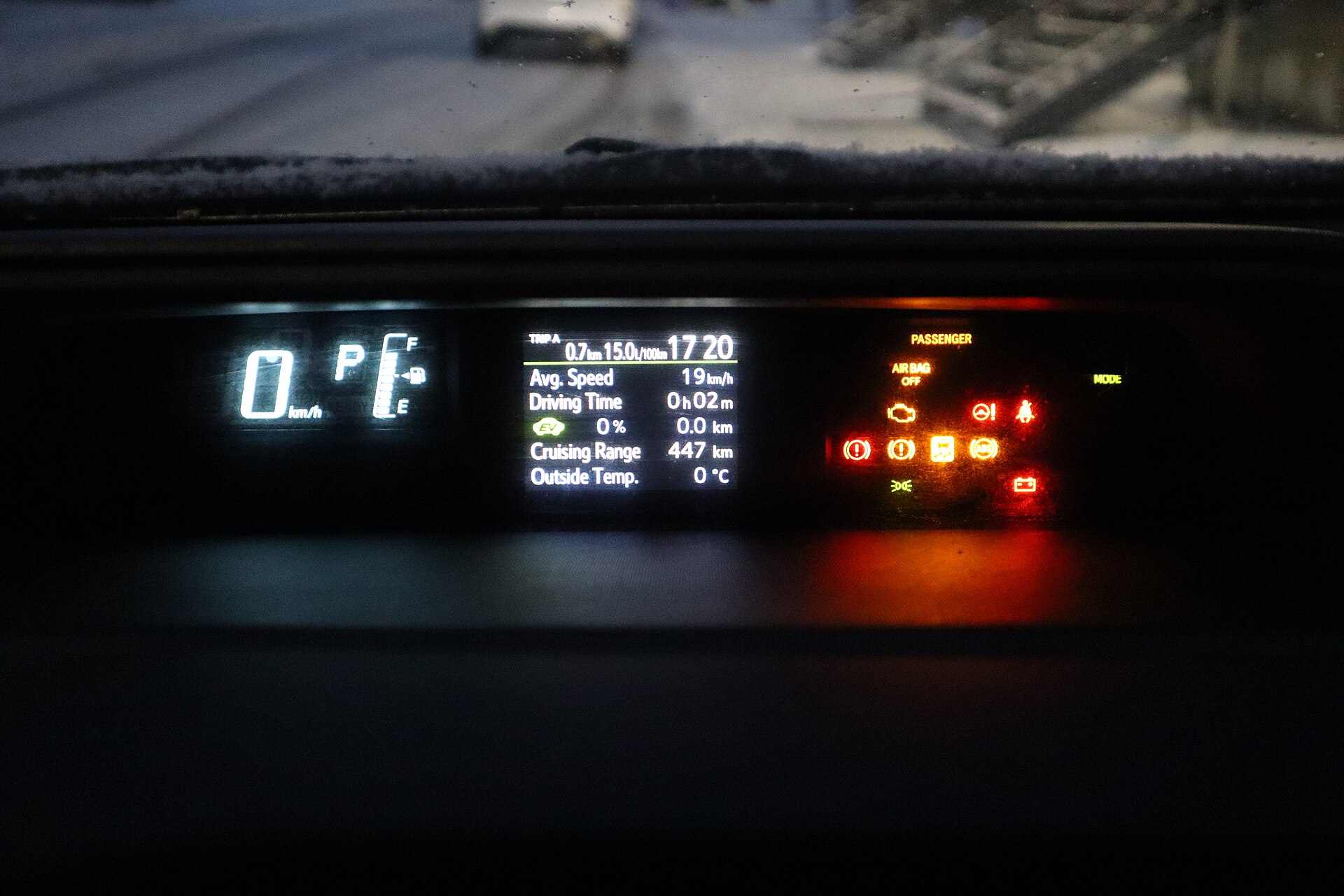
A car's on-board computer, often called the trip computer, is the display layer for data collected by the vehicle's control units. It shows trip distance, fuel or energy consumption, range, average speed, service reminders and warning messages. Its consumption figures are estimates: in an ADAC test of 80 models published in July 2020, only 25 were exact or within 2%.
Key takeaways
- The trip computer reads data from the engine, gearbox, brake and body control units over the car's data network and turns it into readouts.
- ADAC accepts a deviation of up to 5% in the consumption display; most cars in its test showed more fuel use than they really burned.
- Electric cars show consumption without charging losses, which ADAC puts at about 10 to 25%.
- Fault codes are stored separately and read through the 16-pin EOBD socket, which EU petrol cars have carried since 2001.

What the on-board computer is and is not
The on-board computer is the driver-facing part of the car's electronics: a function of the instrument cluster or central screen that calculates and displays trip data and messages. It is not the engine control unit (ECU), which runs injection and ignition, and it is not the infotainment system, even when both share one screen.

Handbooks may call it the trip computer, the multi-function display (MFD) or the driver information centre (DIC). The readout may sit in the instrument cluster, on the navigation screen or in an overhead console. If the abbreviations in your handbook are unfamiliar, our car terms dictionary explains the common ones.
How the trip computer gets its data
The trip computer measures little by itself; it collects signals that other control units already have. Wheel-speed sensors supply speed and distance, the engine control unit knows how much fuel it injects, and the body electronics report outside temperature and lamp faults. A gearbox controller, such as those in modern ZF automatic gearboxes, reports its own temperatures and faults the same way.
These units talk over a data bus, most often CAN (controller area network), which Bosch released in 1986; the 1991 Mercedes-Benz W140 S-Class is usually quoted as the first series car to use it. A modern car may have up to about 70 control units. The trip computer works out consumption from fuel flow and distance, and range from the estimated fuel left and recent average consumption.
Core functions at a glance
Most on-board computers cover the same core functions. Basic units show average consumption and outside temperature; advanced ones add a compass heading, a stopwatch, averages for two drivers, tyre-pressure data and speed warnings.
| Function | What it shows | Typical limits |
|---|---|---|
| Instant consumption | Current fuel use in l/100 km or mpg | Swings with every throttle movement |
| Average consumption | Fuel used since the last reset | An estimate; may differ from the fill-up figure |
| Range (distance to empty) | Estimated distance on the fuel or charge left | Based on recent driving |
| Average speed, trip distance, time | Figures since the last reset | Depends on wheel sensors and tyre size |
| Outside temperature, ice warning | Air temperature, with a warning near freezing | Can read high in slow traffic or sun |
| Service interval | Distance or time to the next service | Some cars adjust it to driving style and oil condition |
| Tyre pressure (TPMS) | Pressure loss, or pressure per wheel | Indirect systems need a reset after inflating |
| Warnings and fault messages | Faults reported by control units | Shows the symptom, not the cause |
| Hybrid and EV screens | Energy flow, kWh/100 km, battery state | Consumption excludes charging losses |
The outside-temperature readout and ice warning are a useful prompt for seasonal jobs such as fitting winter tyres.
How to use and check your trip computer
Reset the trip computer at the right moments and check it against a fill-up calculation now and then.
- Set the units first: l/100 km or mpg, km or miles, and the temperature unit, so the readouts match your logbook.
- Learn the display selector. Most cars cycle through screens with a stalk button or a steering-wheel switch.
- Reset the average consumption when you fill the tank to the brim, so both figures cover the same distance.
- Note the odometer reading and the litres added at every full refuel.
- Calculate real consumption at the next full refuel: litres added divided by kilometres driven, multiplied by 100. For example, 42.0 litres over 700 km gives 6.0 l/100 km (39.2 mpg US).
- Compare that figure with the display. A gap of a few per cent is normal; repeat the check over two or three tanks.
- Read the range with a margin, especially before a motorway stretch or in winter.
- Act on messages by colour. A yellow message usually means "check soon"; a red one means stop safely and consult the handbook.
How accurate is the trip computer?
A trip computer is usually accurate to within a few per cent, but some are far out. The German motoring club ADAC compared the consumption display with measured fuel use in 80 current models, 64 of them with combustion engines, in a test published on 21 July 2020. ADAC regards a deviation of up to 5% as acceptable.
| ADAC test, published 21 July 2020 | Result |
|---|---|
| Models tested | 80, including 64 with combustion engines |
| Display exact to the decimal place | 6 models, from five brands |
| Within 2% of the measured figure | 19 more models |
| Combustion cars showing less than real | 13 of 64 |
The belief that trip computers flatter the driver was not confirmed: most cars showed more fuel use than they actually burned. The largest deviation came from an Audi Q2 35 TDI quattro, which displayed 6.6 l/100 km (35.6 mpg US), about 0.8 litres too much (+13.8%). A BMW X5 xDrive45e plug-in hybrid overstated consumption by about 1 litre (+9.4%).
Electric cars show energy drawn from the battery, not from the grid, so charging losses of about 10 to 25% do not appear, according to ADAC. Nor should any display be compared with the official WLTP figure, which comes from a 30-minute laboratory cycle over 23.25 km (14.4 mi).
Fault codes and EOBD diagnostics
When a control unit detects a fault, it stores a fault code that a reader can retrieve through the diagnostic socket; the trip computer usually shows only a message or a warning lamp. In the EU this system is called EOBD. Under Directive 98/69/EC it became mandatory for petrol cars first registered from 1 January 2001 and for diesel cars from 1 January 2004, with new types a year earlier.
The socket is a 16-pin SAE J1962 connector, normally within reach of the driver's seat. Codes have five characters, and the first letter shows the system: P for powertrain, B for body, C for chassis and U for the network. Emission-related faults switch on the malfunction indicator lamp (MIL), the yellow engine symbol often called the check-engine light.
Plug-in readers and add-on displays
A plug-in reader or smartphone app can read and clear codes, and add-on gauges can show live engine data through the same socket. Useful for a first look, but a code names the circuit that reported the fault, not necessarily the faulty part. Aftermarket on-board computers, once common in trucks and vans, come as universal units or units made for one model; the model-specific type usually reads more data, so check compatibility before buying.
Safety functions in the same display
Several safety systems required by EU law report through the on-board computer display, even though they are not trip functions.
- TPMS. Tyre-pressure monitoring has been required on all new passenger cars in the EU since 1 November 2014. Direct systems use a sensor in each wheel; indirect systems compare wheel speeds and must be reset after the tyres are inflated. Correct pressures depend on tyre size and load and are given in the handbook.
- eCall. After a serious crash, eCall dials 112 automatically and sends the vehicle position and impact data; an SOS button allows a manual call. It has been required on new car models type-approved in the EU since 31 March 2018.
- GSR2 systems. Vehicles first registered after 7 July 2024 must carry systems such as intelligent speed assistance (ISA), which warns of the speed limit using road signs and map data, driver drowsiness warning, reversing detection and an event data recorder.
A short history of the trip computer
The trip computer started as a mechanical average-speed meter: the Fiat 1900 of 1952 offered a "mediometro", and the Saab GT750 of 1958 had a Halda rally unit as standard. Electronic units followed in 1978 with the "Cadillac Trip Computer" on the Seville and Chrysler's unit for the Omni and Horizon.
Common mistakes to avoid
Most problems come from trusting estimates too far or ignoring messages.
- Driving on when the range shows zero; running a diesel dry can mean bleeding the fuel system.
- Judging town consumption by an average that still includes a long motorway trip.
- Expecting the display to match the WLTP figure from the brochure.
- Ignoring a warning that keeps returning, or clearing fault codes without a diagnosis.
- Leaving a cheap OBD dongle plugged in for weeks. Some draw current while the car is parked, and ADAC statistics published in April 2026 put battery faults at almost half of its 2025 breakdown call-outs. Timed parking heaters, such as liquid engine heaters, also draw on the 12 V battery in winter.
- Cleaning the screen with household sprays instead of a soft cloth; see our tips on protecting the car interior.
More practical guides are collected in our car advice section.
FAQ
Why does the trip computer differ from my fill-up figure?
The display estimates fuel use from injection data, while the fill-up method measures the fuel you actually bought. In ADAC's 2020 test, 6 of 80 models were exact and 19 more were within 2%; ADAC considers up to 5% acceptable.
Is the range display reliable?
It is a reasonable guide, but it is calculated from recent consumption. A motorway stretch, cold weather or a heavy load can cut the real range well below the figure shown.
How do I reset the trip computer?
In most cars you select the trip or average screen and hold the reset button on the stalk or steering wheel for a few seconds. Some models reset through the settings menu; the handbook gives the exact steps.
Can I read fault codes myself?
Yes. A plug-in reader connected to the 16-pin EOBD socket can read stored codes on EU petrol cars from 2001 and diesel cars from 2004. A code points to a circuit or system, so a workshop diagnosis is still needed before replacing parts.
Do electric cars show real consumption?
Not fully. The display shows energy taken from the battery, so charging losses of about 10 to 25%, as stated by ADAC, are missing. The kWh figure on your charging bill or wallbox gives the real consumption.
Safety note: change on-board computer settings only when the car is stationary. A red warning means stop as soon as it is safe and follow the handbook; do not drive on with a red oil-pressure, brake or temperature warning.


